> ## Documentation Index
> Fetch the complete documentation index at: https://devdocs.paywithatoa.co.uk/llms.txt
> Use this file to discover all available pages before exploring further.
# Bank Feed | Getting Started
> Get started with Atoa Bank Feed: authorise a bank, then fetch account details, balances and transactions via Open Banking.
## Step 1: Request API Access
To get started, follow these steps:
1. **Contact Us**: Email [hello@paywithatoa.co.uk](mailto:hello@paywithatoa.co.uk) with your use case to request access.
2. **Receive Credentials**: We’ll provide you with both Production and Sandbox Secret Keys, along with your merchant ID.
3. **Authenticate Requests**: Include your API key in the header of all requests:
In the sandbox environment, we return static data. Make sure to switch to the
production environment before going live.
```
Authorization: Bearer sk_live_8aa94380efb94298aa4fe932ad78b22b
```
## Consent & Data Flow
### Step 2: Initiate the Consent Journey
Your app must initiate a consent request that allows users to connect their bank account(s). This will return a URL where users can authenticate securely via their bank.
**Endpoint**
```bash theme={null}
POST api.atoa.me/api/bank/auth/initiate
```
**Example Request**
```javascript theme={null}
{
"redirectUrl": "https://your-app.com",
"callbackParams": { //Optional: Pass any key-value pairs
"userId": "user_123",
}
}
```
**Example Response**
```javascript theme={null}
{
"url": "https://atoa.me/link-bank?accountAuthId=ed016c93-68c2-4394-8e9c-1e700f8a1b15&expiresAt=2025-04-16T17:53:48.174Z&env=PRODUCTION",
"accountAuthId": "ed016c93-68c2-4394-8e9c-1e700f8a1b15",
"expiresAt": "2025-04-16T17:53:48.174Z"
}
```
**Key Considerations**
* `accountAuthId` is essential for tracking user consent and is used in subsequent requests.
* `callbackParams` are passed transparently to your redirect URL along with additional provided parameters.
* `bankAccountIds` returned in the callback represent the unique identifiers for user bank accounts. These remain consistent throughout the user's lifecycle.
Once the user completes consent, they'll be redirected to your redirectUrl:
```
https://{{your-redirect-url}}?status=SUCCESS&accountAuthId=ed016c93-68c2-4394-8e9c-1e700f8a1b15&bankAccountIds=acc_001,acc_002&userId=abc_123
```
**Important Notes**
* Users may authorize multiple bank accounts; each bank account id will be appended in the callback as comma-separted value `bankAccountIds`.
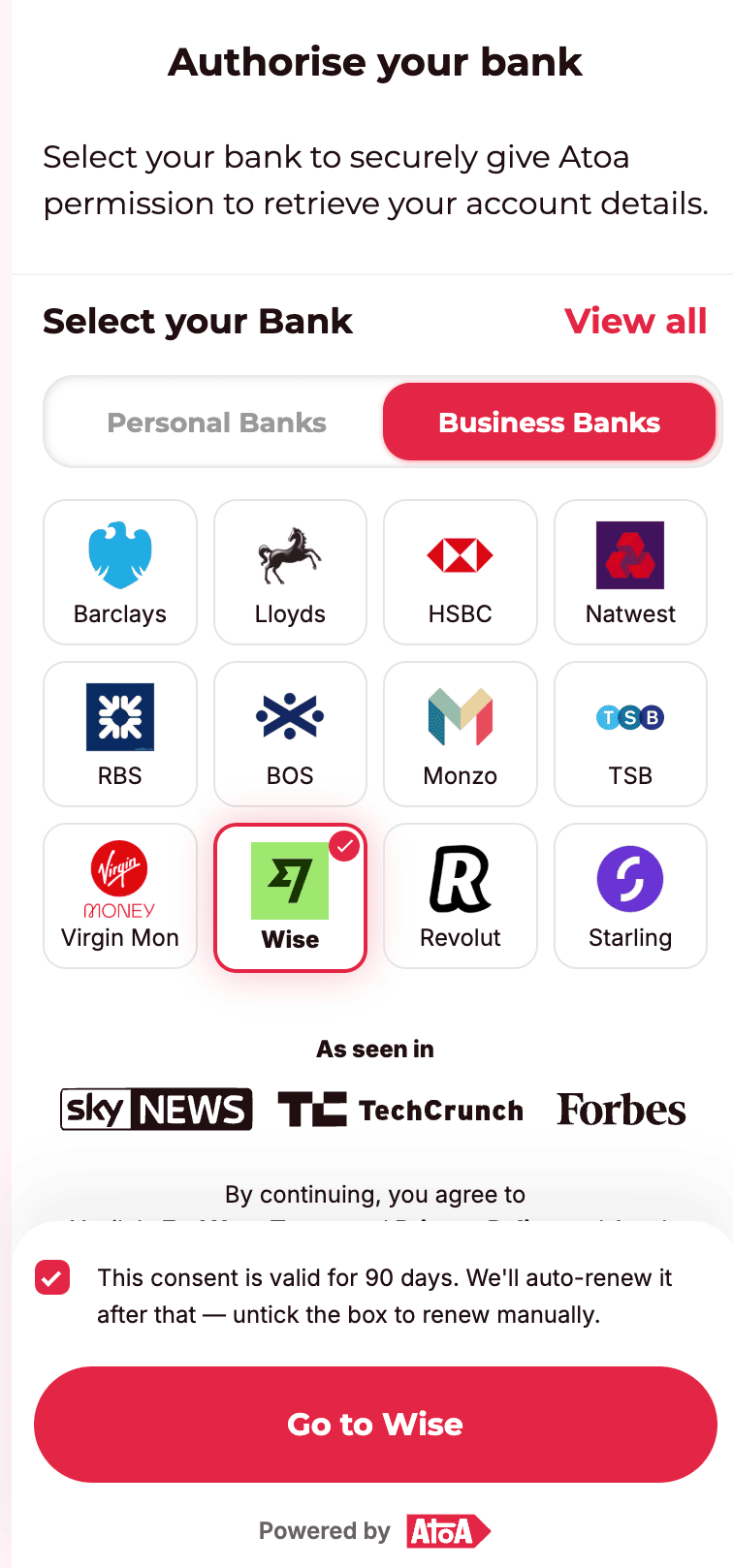
* If the user unchecks the consent renewal checkbox, consent will not auto-renew after 90 days and must be reinitiated.
* Consent can also be manually revoked by the user via their banking app at any time.
## Step 3: Retrieve Transactions
Use the **bankAccountId** from the callback to fetch transaction data.
**Endpoint**
```bash theme={null}
GET api.atoa.me/api/bank/accounts/{accountId}/transactions?from=2024-01-01&before=2024-03-01
```
**Example Response**
```javascript theme={null}
{
"data": [
{
"id": "txn_001",
"date": "2024-01-14T11:45:00Z",
"type": "DEBIT",
"amount": 89.99,
"currency": "GBP",
"description": "Amazon Marketplace",
"reference": "INV-4321-A",
"transactionCategory": "E-commerce",
"status": "BOOKED",
"balance": {"amount": 2.37, "currency": "GBP"} //Optional
}
],
"meta": { "count": 1 },
"links": {
"prev": "https://api.atoa.me/api/bank/accounts/{accountId}/transactions?cursor=aaa",
"self": "https://api.atoa.me/api/bank/accounts/{accountId}/transactions?cursor=bbb",
"next": "https://api.atoa.me/api/bank/accounts/{accountId}/transactions?cursor=ccc"
}
}
```
Results are cursor-paginated — follow `links.next` in the response to fetch subsequent pages. See [Cursor-based pagination](/api-reference/AccountInitiationServices/fetch-account-transactions#cursor-based-pagination) on the Transaction API reference for the full contract, field descriptions, and worked examples.
## Step 4: Retrieve Bank Account Metadata
Use this API to fetch account-level metadata such as account number and sort code for the authorized account.
**Endpoint**
```bash theme={null}
POST api.atoa.me/api/bank/accounts/{accountId}
```
**Example Response**
```javascript theme={null}
{
"bankName": "HSBC UK",
"accountNumber": "12345678",
"sortCode": "112233"
}
```
**Why This Matters**
* Useful for matching and linking bank accounts to internal user profiles.
* Ensures clarity when a user has multiple accounts with similar names.
* Always validate this information securely before displaying it to users.
Refer to the [Get Bank account](/api-reference/AccountInitiationServices/fetch-account-details) API to know more about the response data and error handling.
## Step 5: Revoke Consent
If you wish to terminate access programmatically, you can revoke access the following way:
**Revoke a Specific Account**
```bash theme={null}
POST api.atoa.me/api/bank/auth/revoke?accountId=0011223344
```
Deletes consent for the specific bank account from Atoa's records. If this is the last bank account associated with that consent, it will also revoke consent at the user's bank.
**Revoke All Accounts**
```bash theme={null}
POST api.atoa.me/api/bank/auth/revoke
```
Use this to fully revoke the consent. This deletes all bank accounts consent from the user's bank and from Atoa.
## Consent Lifecycle & Expiry
* All consents are valid for 90 days.
* If auto-renew is enabled, we will attempt background renewal before expiry.
* Once expired, any call to transactions or account endpoints will return: 404 Consent not found
Below is a screenshot showing the bank selection screen and the auto-renewal checkbox for reference.
 🧠 **Recommendation**: Prompt users to re-authenticate as consent expiration nears (e.g., 7 days before expiry).